本教學示範如何解決 Android Studio 的 Failed to import Gradle project 問題。這個問題發生在 Android Studio 0.1.x 升級至 0.2.x 之後。詳細提示內容如下︰
Failed to import Gradle project: Could not fetch model of type 'IdeaProject' using Gradle distribution 'http://services.gradle.org/distributions/gradle-1.6-bin.zip'.
A problem occurred configuring project ':Test'.
A problem occurred configuring project ':Test'.
Failed to notify project evaluation listener.
Could not resolve all dependencies for configuration ':Test:_DebugCompile'.
Could not find any version that matches com.android.support:support-v4:13.0.+.
Required by:
    TestProject:Test:unspecified

Consult IDE log for more details (Help | Show Log)

how-to-solve-the-problem-of-Failed to import Gradle project of android studio
安裝 Android Support Repository
-
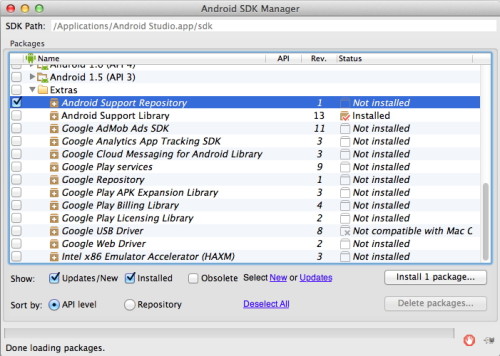
打開「Android SDK Manager」,選擇「Android Support Repository」,然後按「Install Package…」,之後選擇「Accept」安裝。
-
之後關閉「Android Studio」,重新開啟即可。